
Capsule CRM review Australia 2026: honest verdict after a real trial
Reviewed by Brett Armstrong, 2 June 2026. I signed up for the free Starter plan from an Australian IP, added contacts, built a sales pipeline, tested the integrations and wrote what I found. This page contains affiliate links: if you sign up to Capsule via /go/capsule/, StackPick earns a small recurring commission at no cost to you. We'd write the same review either way. See how we review and our affiliate disclaimer for the full disclosure.
If you've ever opened Salesforce or HubSpot and quietly closed the tab, Capsule is the CRM you've been waiting for. It is fast, clean and you can have a working sales pipeline in under fifteen minutes. The catch for Australian small businesses is the integration story: Capsule plugs into Xero with no fuss, but it does not currently integrate with MYOB, and it has no native GST or invoicing of its own.
That makes Capsule a sharp fit for one specific type of AU business, and the wrong call for another. I'll lay out which is which below, with screenshots from the trial I ran today.
30-second verdict
Pick Capsule if:
- You run your books in Xero and want a CRM that won't double-handle your contact data
- You're a sole trader or 1 to 5 person team
- You live in Gmail or Outlook
- You tried Salesforce, HubSpot or Zoho and bounced off the complexity
- You want a free plan that actually works (250 contacts, 2 users, forever)
Skip Capsule if:
- You run MYOB. There is no native MYOB integration as of today.
- You're standardised on Microsoft 365 with Teams. Capsule integrates with Outlook only, not the wider suite.
- You need invoicing or GST handling inside the CRM
- You're a 10+ person outbound sales team that needs branching workflow automation
- You want a CRM that doubles as a project management or accounting tool
Free Starter plan is the right way to test this. No credit card, two users, 250 contacts, one sales pipeline. Genuinely usable for a sole trader.
Free Tool
Costing CRM against your current stack?
Capsule is one piece of the puzzle. If you're picking accounting software at the same time, run the numbers on Xero, MYOB or QuickBooks first so you know what's left in the budget.
Try the calculator →How I tested Capsule
I signed up for Capsule's free Starter plan on 2 June 2026 from my Melbourne login. The whole thing took 90 seconds: email, name, password, confirm. No card, no pushy onboarding sequence trying to upsell me before I'd seen the product.
Once inside, I added three contacts (a fictional building company, a fictional accountant, a real existing relationship), built a four-stage sales pipeline, created three opportunities, assigned a follow-up task with a due date, and tested every integration I could see in the settings.
I've spent enough time in Salesforce, HubSpot, Pipedrive and Zoho across the last decade of running a Melbourne marketing agency to have a clear benchmark for "easy to set up." Capsule beats all four. That's not faint praise.
First impressions
The first thing you see on login is the dashboard, and what's notable is what's missing: there are no popups, no walkthroughs blocking you, no "complete your profile" nag bars. Capsule trusts you to find your way around. For people like me who learn by clicking, that is the right call.
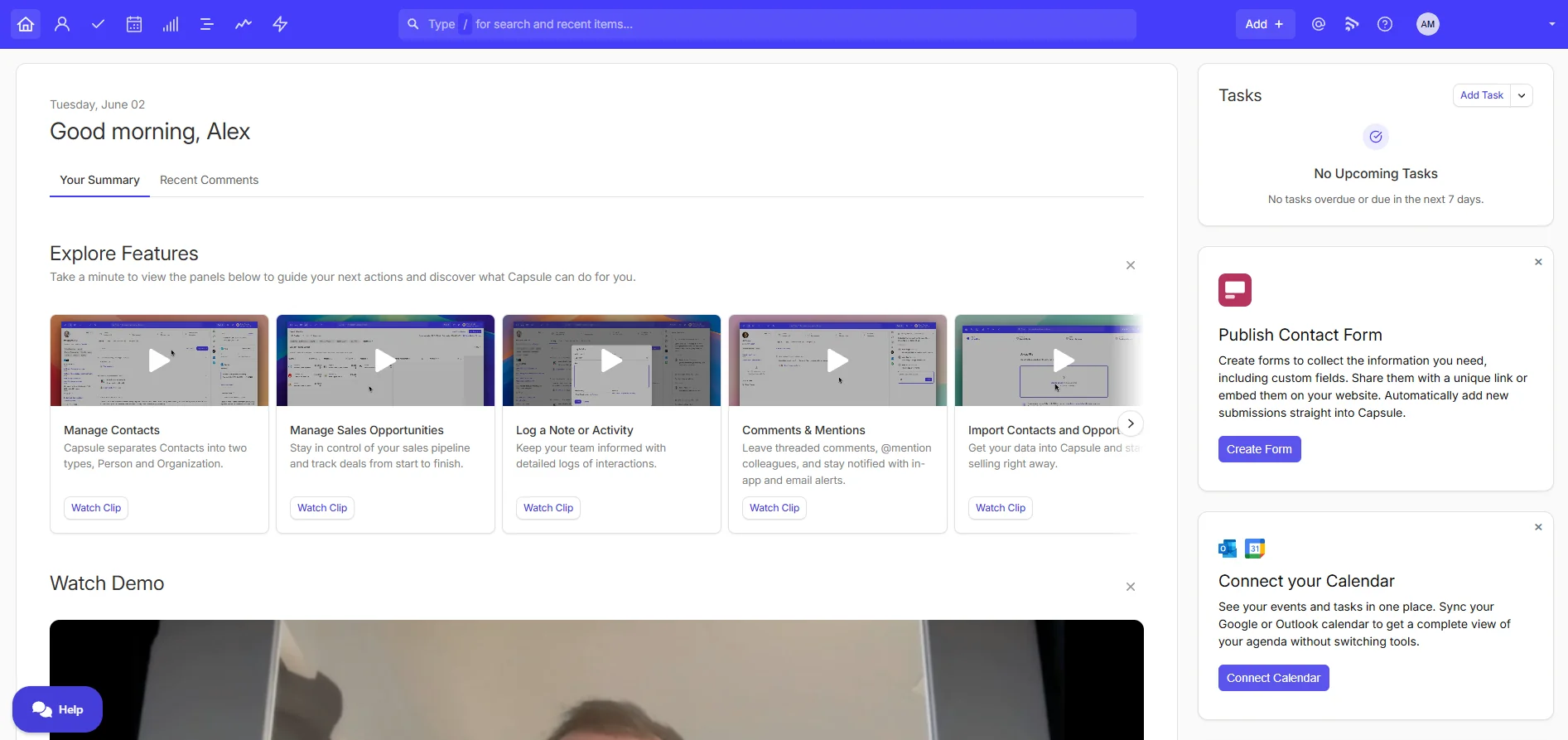
The left navigation has five things: Inbox, People & Organisations, Sales Pipeline, Projects, and Tasks. That's the whole product, more or less. Compare that to HubSpot's sidebar, which buries the actual CRM under marketing, sales and service hubs you may not even pay for.
The upgrade prompts exist but they are quiet. You'll see a small "Upgrade" link in the corner and the occasional locked feature with an explanation. Capsule isn't pretending the free plan is the same as the paid plan, but it's also not crippling you to force the upgrade.
Contacts, pipelines and tasks
This is the bulk of any CRM review. I'll go through each in the order you'll use them.
Contacts
A contact in Capsule is what you'd expect: name, organisation, phone, email, tags, custom fields, activity history. On the free plan you get five custom fields; paid tiers give you more. The thing that surprised me is how clean the record view is.
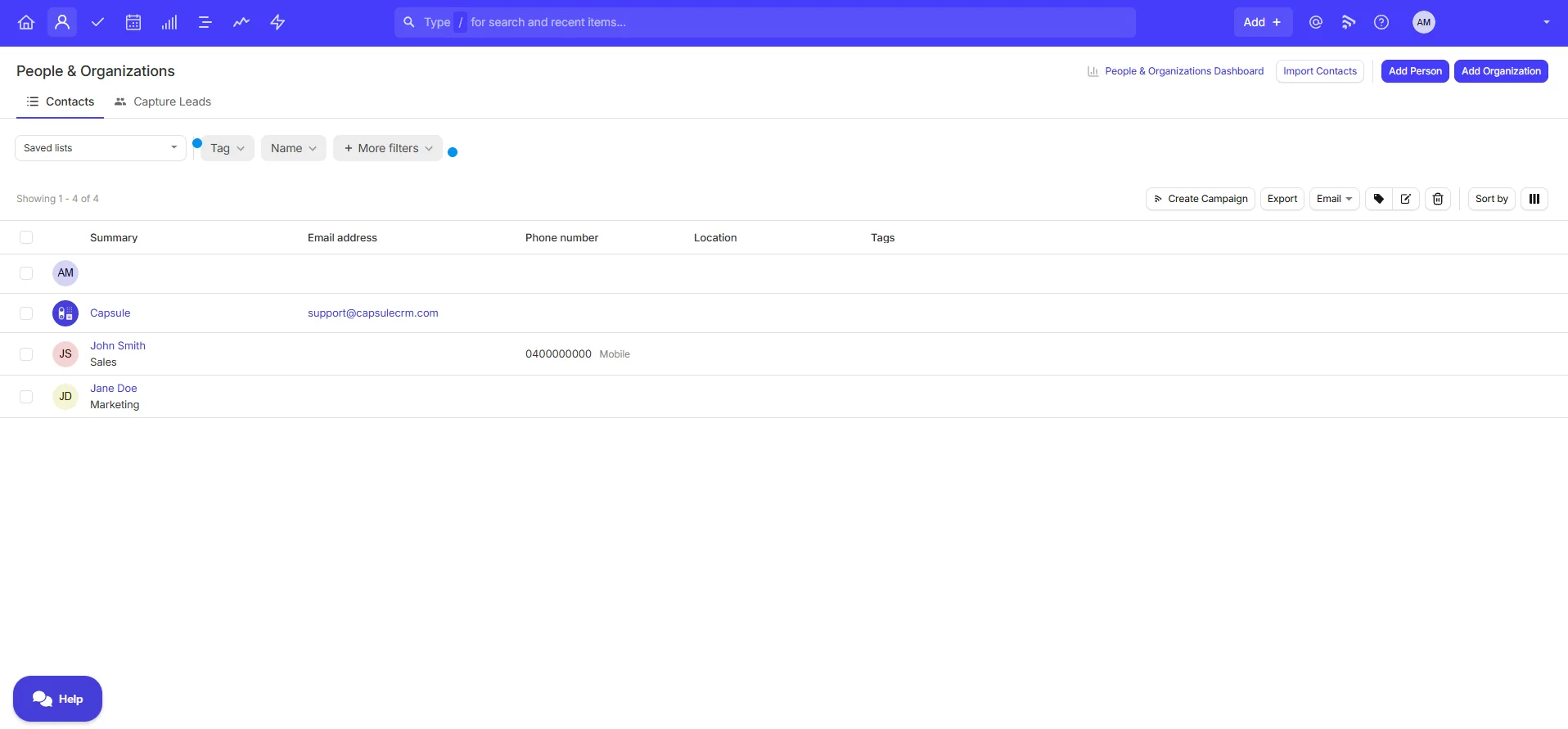
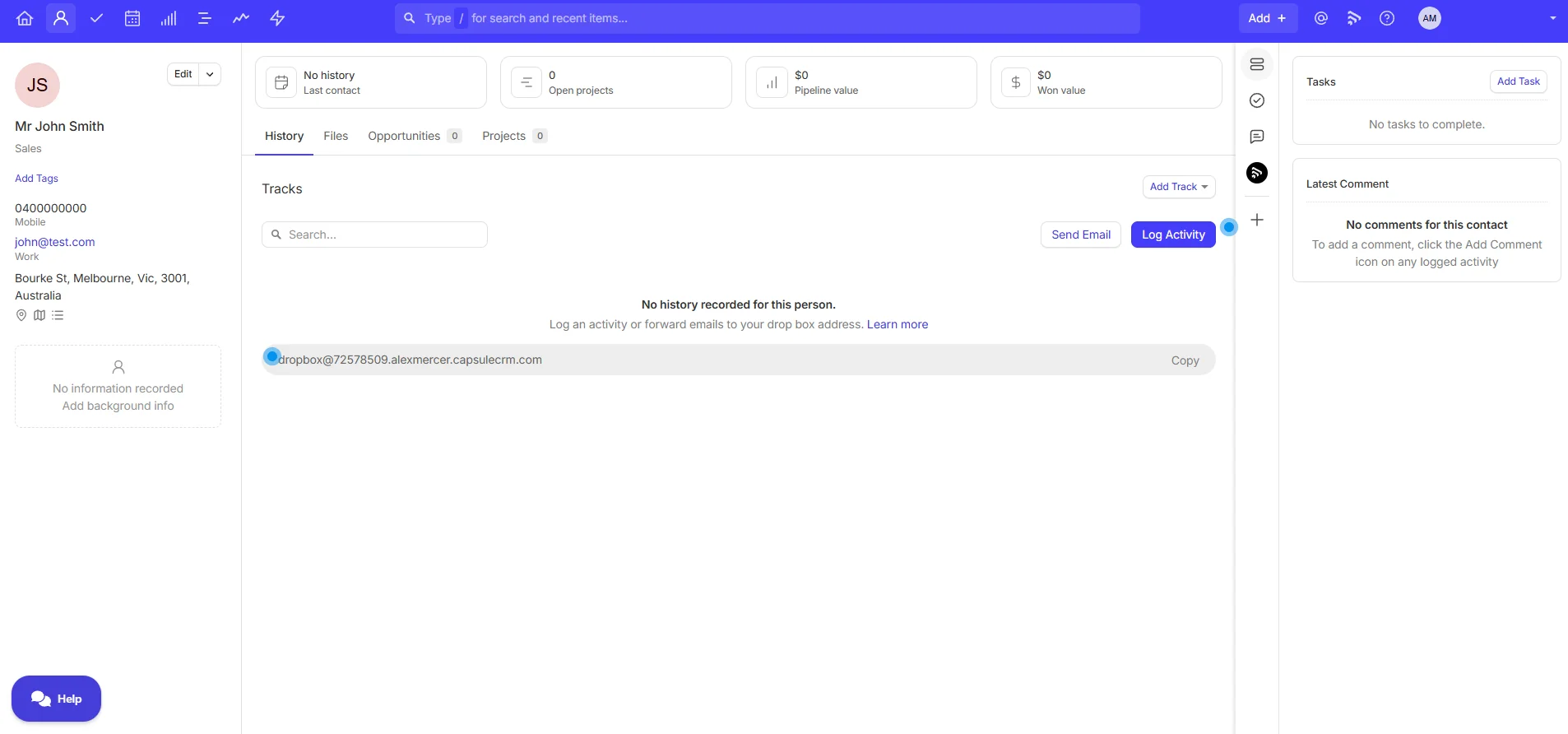
Everything you need on one screen, nothing you don't. Tags are useful for segmenting (e.g. "lead source: referral", "industry: trade", "status: cold"). The activity feed automatically logs emails, tasks, opportunities and notes against the contact, so you have one source of truth for what's happened with that person.
The 250-contact cap on the free plan is genuinely fine for a sole trader. If you're at 200 active relationships, you're probably past the point of needing a CRM anyway and were doing it in your phone or spreadsheet. Capsule turns that mess into something searchable.
Sales pipeline
This is Capsule's signature view, and the reason most people pick it over the more contact-database CRMs like Nimble.
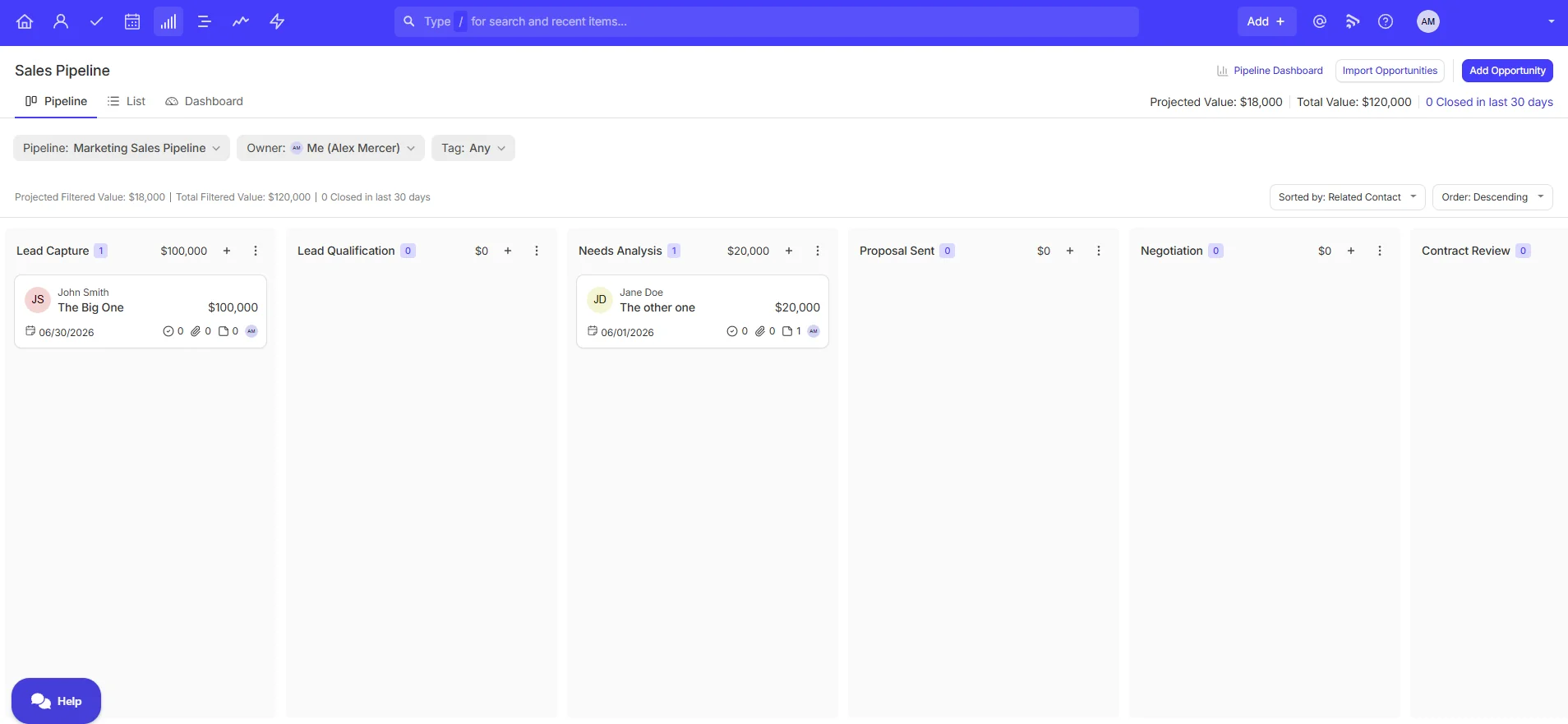
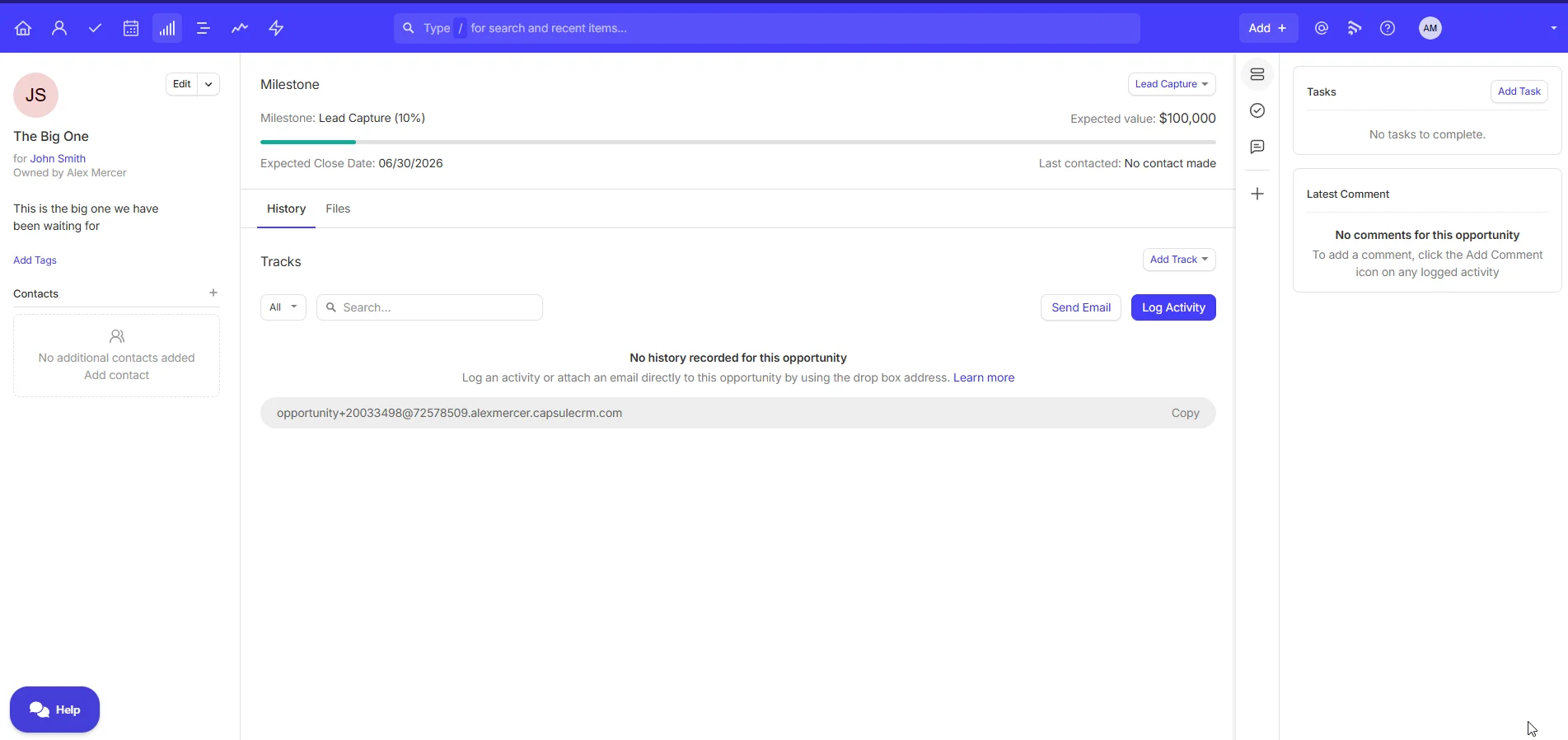
You build a pipeline by naming stages (e.g. New Enquiry, Quoted, Negotiating, Won, Lost), then drag opportunities between them. Each opportunity is a card with a value, a probability, an expected close date, and a linked contact. Clicking through gives you the full record.
On the free plan you get one pipeline. Paid tiers give you multiple pipelines, which matters if you sell more than one product line (e.g. you separate "new client work" from "upsells to existing clients" because they have different stages).
Capsule's pipeline view is faster than Pipedrive's and cleaner than HubSpot's. The downside is that automation here is light: Capsule has "Tracks," which are predefined task sequences (e.g. when a deal moves to Quoted, create three follow-up tasks two days apart). That's useful for standardising follow-up, but it isn't true if/then conditional automation. If your sales process branches based on deal size, deal type or activity completion, you want Pipedrive's workflow builder instead. (More on that comparison below.)
Tasks and the calendar
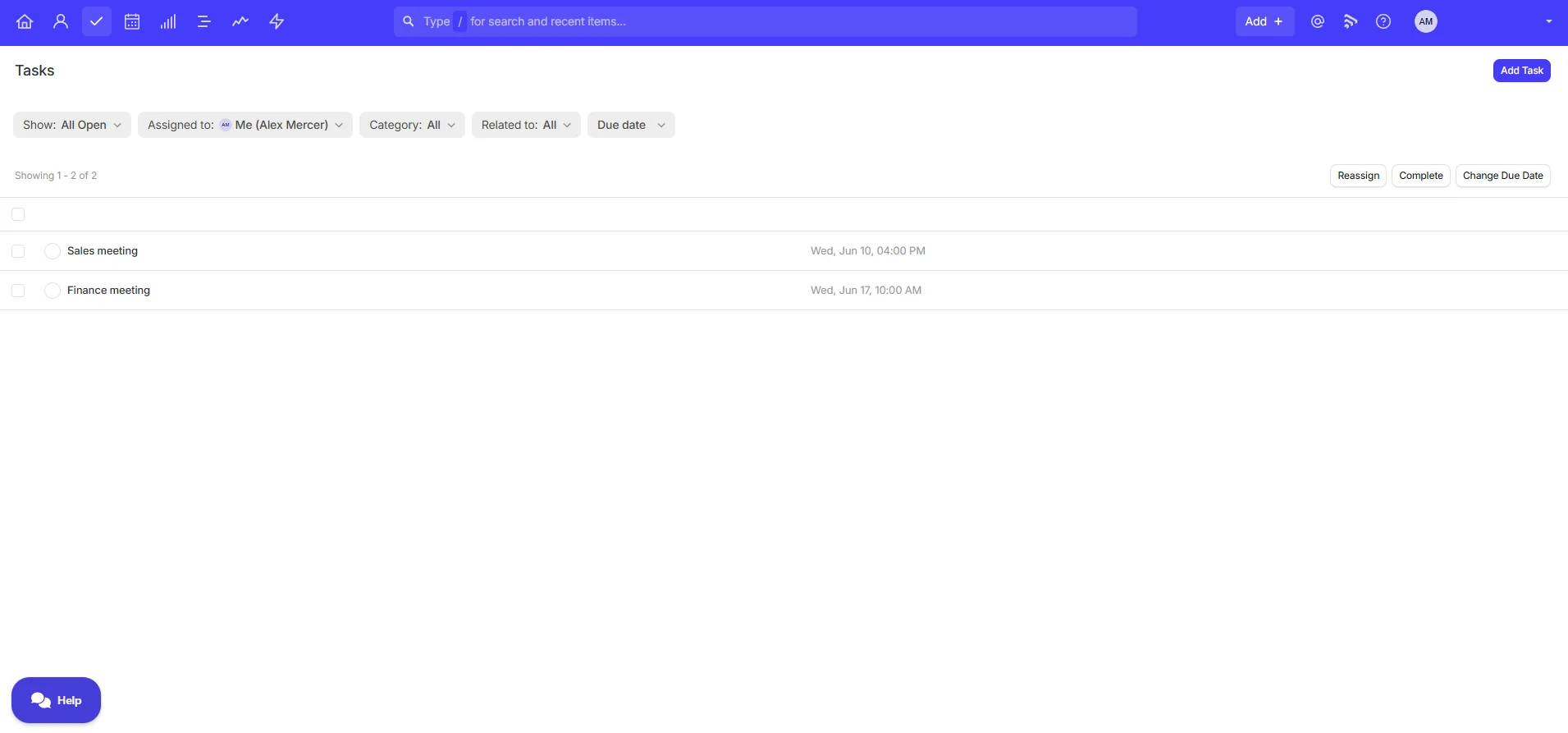
Tasks are tied to contacts and opportunities, with due dates and categories. The Tasks view is a simple chronological list, sortable by due date.
The Calendar view shows scheduled activity across whatever timeframe you pick.
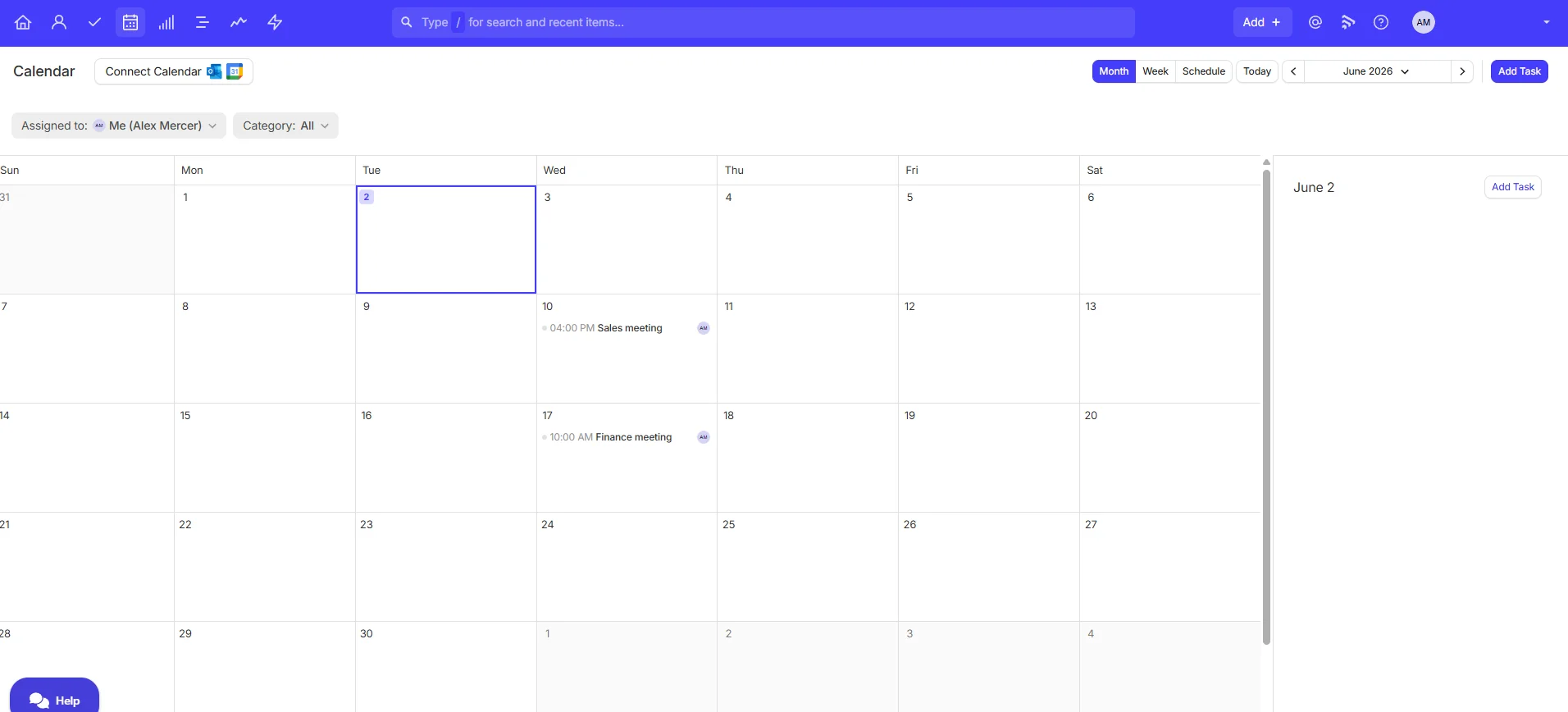
Both views are basic and that's fine. Capsule doesn't try to be Asana, Monday or ClickUp. The job of the task view is to tell you who needs a call back on Thursday, and it does that without ceremony.
The Australian integration story (the make-or-break section)
This is where most Capsule reviews lose Australian readers, because they don't check the integrations from an AU lens. I did.
| Integration | Available? | Notes |
|---|---|---|
| Xero | Yes | Native, on all plans. The one that matters for AU. |
| MYOB | No | Confirmed via Capsule's integrations page, 2 June 2026 |
| QuickBooks | Yes | Available on paid plans |
| Google Workspace | Partial. Gmail and Calendar as individual tools, no full Workspace branding | Single sign-on on free plan |
| Microsoft 365 | Outlook and CRM for Outlook only. No full 365 suite (Teams, SharePoint) | Single sign-on on free plan |
| Mailchimp | Yes | Paid plans |
| Transpond | Yes, native | Capsule's own email marketing tool (same parent company, Zestia) |
| Slack | Yes | |
| ServiceM8 / Tradify | No native | Zapier workaround only |
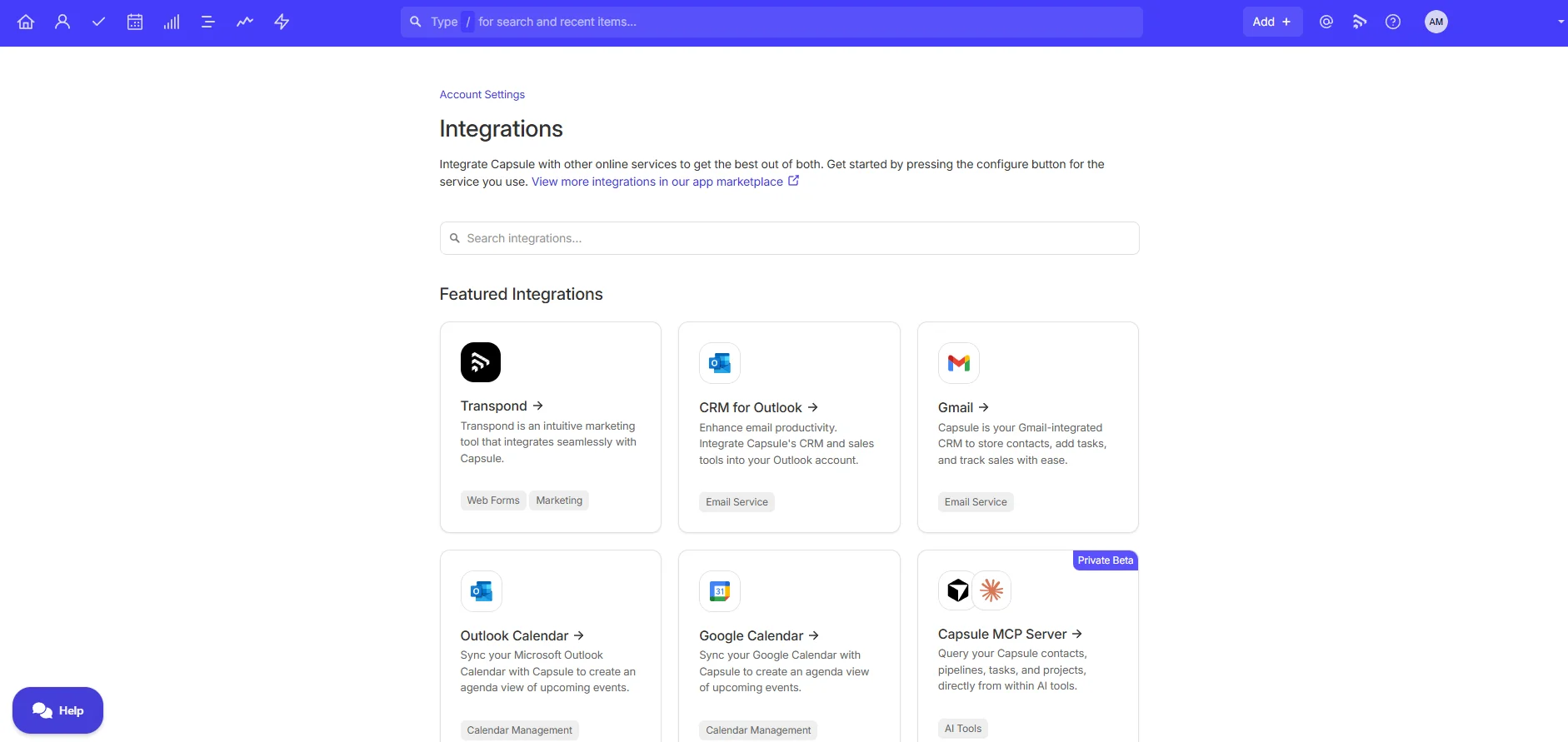
The Xero integration is the headline. It's bidirectional: contacts sync, you can see Xero invoices against a Capsule contact, and you can push new contacts straight into Xero from Capsule without re-typing them. For a Xero shop, that's the kind of small daily friction removal that earns the subscription back inside the first month.
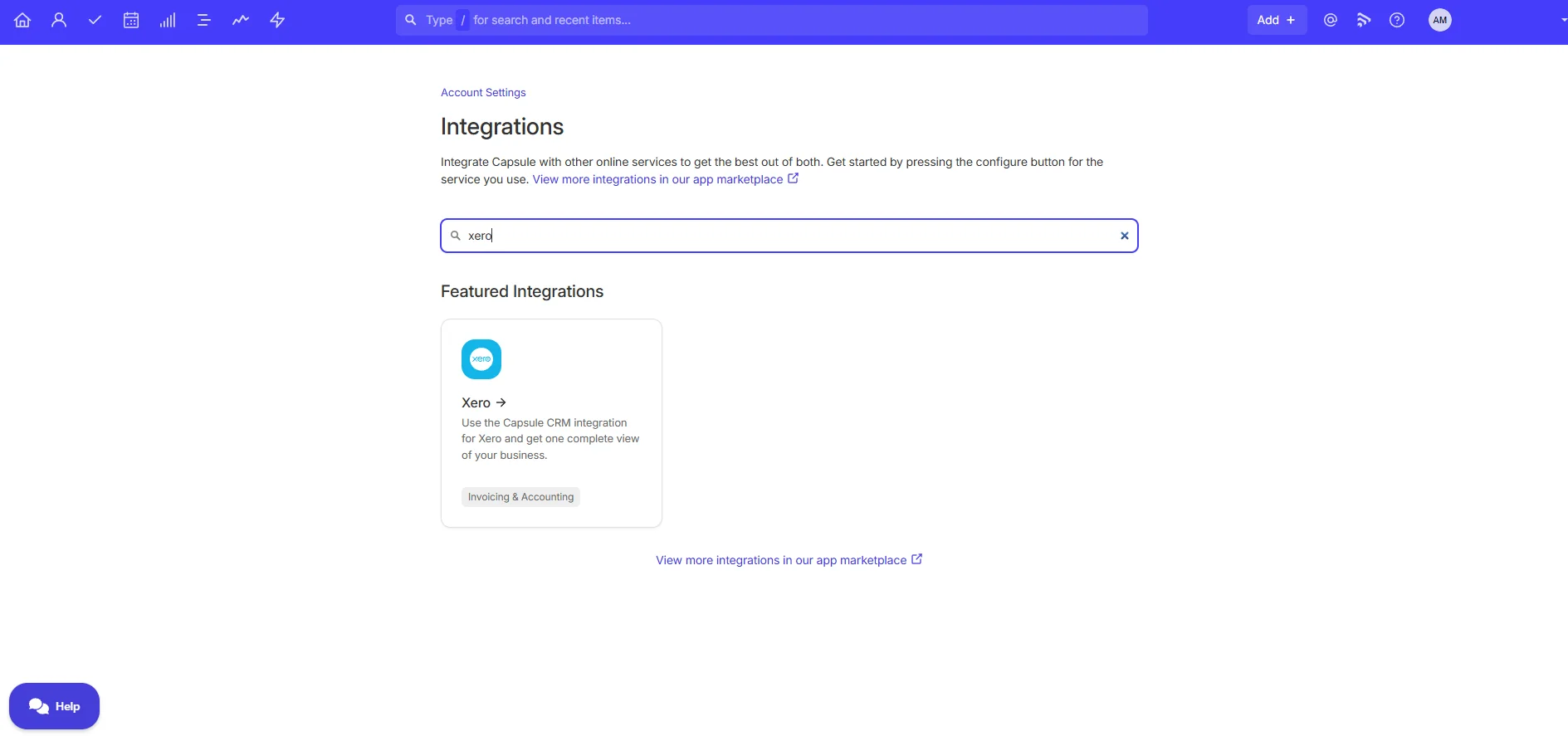
The MYOB gap is real and worth saying plainly: if you do your books in MYOB, Capsule will not talk to it natively. You can workaround via Zapier, but you're stitching together two systems that don't know about each other. For MYOB shops, look at Pipedrive or HubSpot, both of which have MYOB connectors via Zapier and broader integration ecosystems.
On GST: Capsule does not handle GST or tax inside the CRM. It is not an invoicing tool, it is a relationship and pipeline tool. You'll still run invoicing through Xero, MYOB or QuickBooks. If you're looking for one tool that does CRM and invoicing, that's a different category (look at Zoho One or HubSpot's quote-to-cash setup, both heavier).
Pricing in plain English
Capsule's pricing is in USD. I'll list both the official USD figures and an indicative AUD conversion (check the live rate when you sign up, current AUD is around 1.5x USD).
| Plan | Annual (USD) | Indicative AUD | Contacts | Best for |
|---|---|---|---|---|
| Free | $0 | $0 | 250 | Sole traders, testing, side projects |
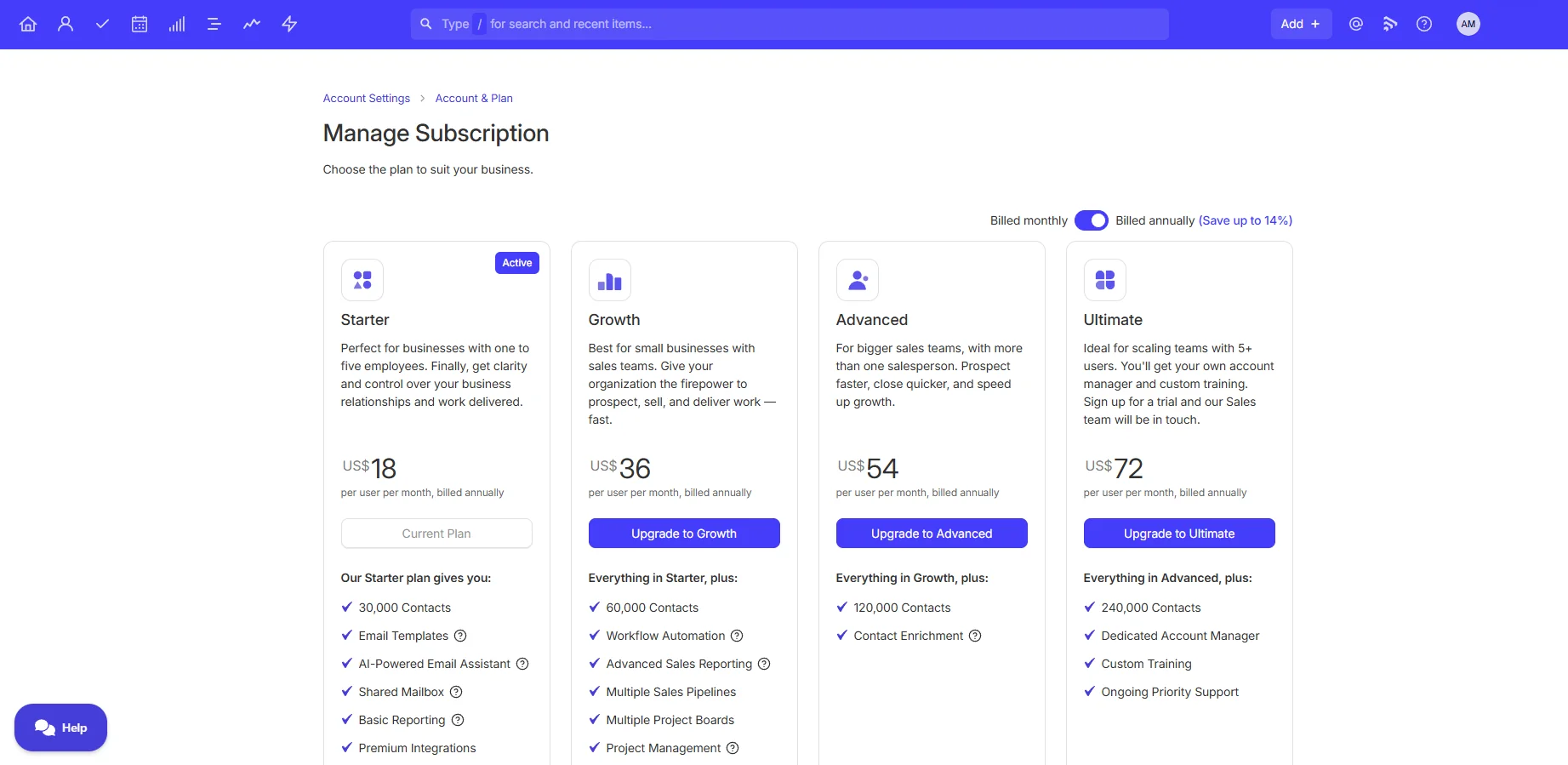
| Starter | $18/user/mo | ~$27 | 30,000 | 1 to 5 person businesses |
| Growth | $36/user/mo | ~$54 | 60,000 | Small sales teams, multiple pipelines, workflow automation |
| Advanced | $54/user/mo | ~$81 | 120,000 | Mid-size teams needing custom roles and advanced reporting |
| Ultimate | $72/user/mo | ~$108 | 240,000 | Larger teams wanting premium support and sandbox |
Pay annually and you save up to 14 percent. Any tier has a 14-day free trial with no card required. (Verified at capsulecrm.com/pricing on 2 June 2026.)
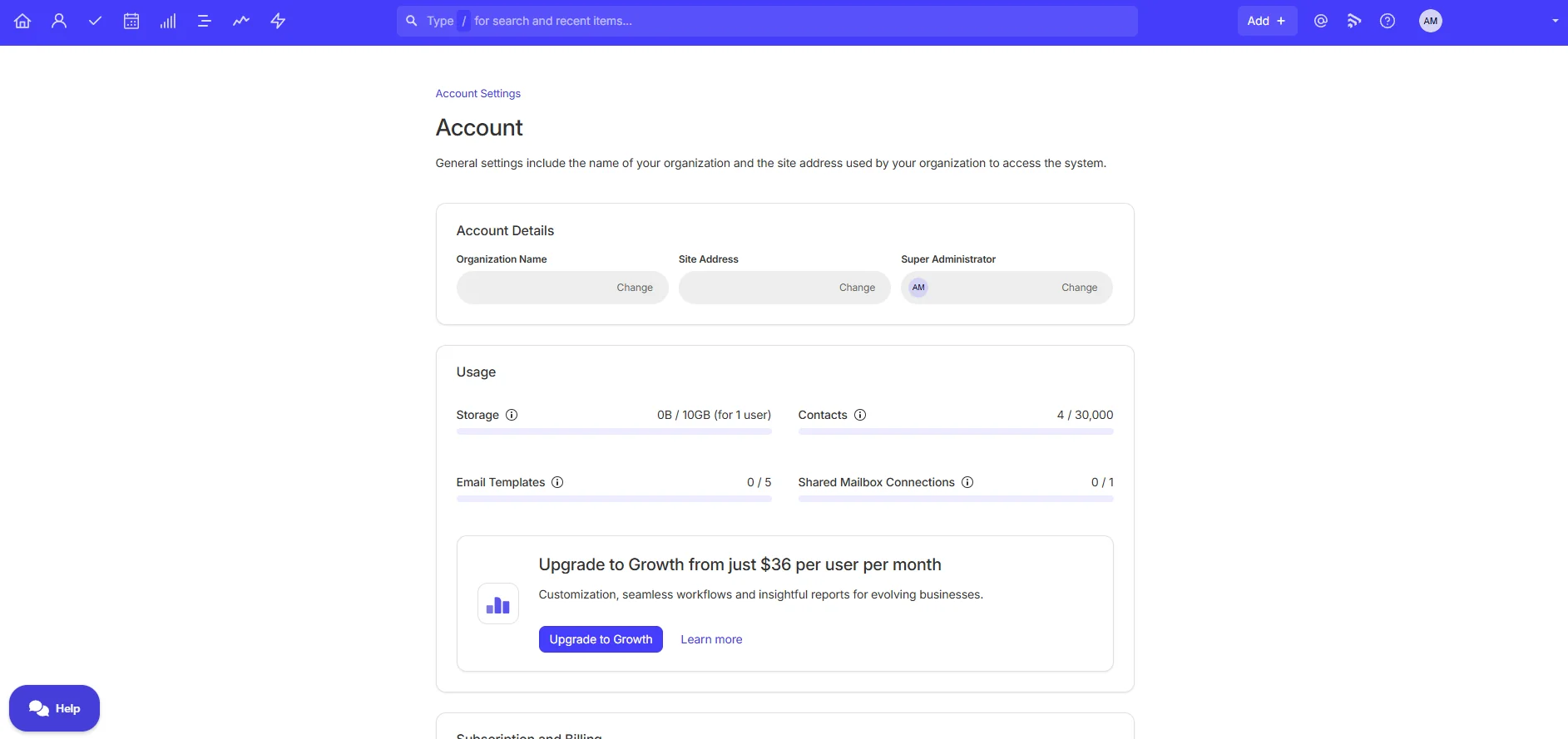
The free plan is the headline. Most "free" CRM plans are trial traps designed to get you hooked then upgrade. Capsule's free plan is genuinely usable forever for 2 users and 250 contacts. A sole trader can run their entire business on it.
For context on what you actually get on free:
- 2 users
- 250 contacts
- 1 sales pipeline
- 5 custom fields
- 50 MB file storage
- Gmail and Outlook single sign-on
- 10 AI content assists per month
Compared to AU-relevant alternatives:
- HubSpot Free is more generous on contacts (unlimited) but the upgrade jump is steep (HubSpot Sales Hub Starter is US$15/user/mo but the meaningful features start at the Professional tier, US$100/user/mo)
- Pipedrive has no free plan at all, only a 14-day trial
- Zoho CRM Free is limited to 3 users and 5,000 records but adds more depth on the free tier
- Salesforce Starter is US$25/user/mo, no free plan
For an AU sole trader on Xero, Capsule's free plan is the cheapest credible way to actually run a real sales process.
Free Tool
Work out your real monthly software bill
Capsule plus Xero is one common stack. Run the numbers on the accounting side so you can see what the full monthly outlay looks like before you commit.
Try the calculator →Reports, mobile and AI
Reporting
Free plan gives you no built-in reports beyond raw lists. Starter unlocks basic reporting (won/lost analysis, pipeline value over time, activity per user). Growth and above add reporting dashboards and the ability to drill into where deals stall.
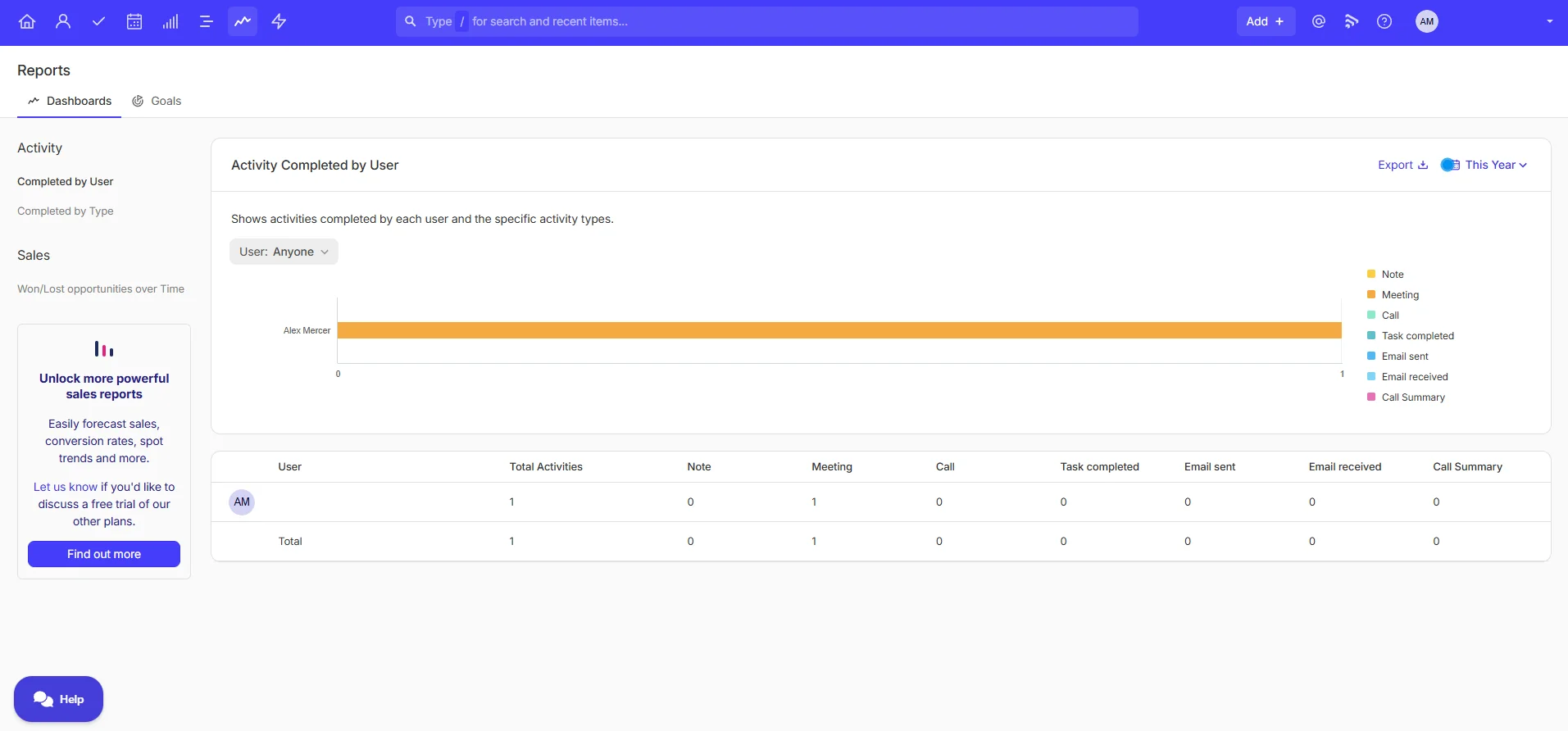
If reporting depth matters for you, the jump from Starter to Growth (US$18 to US$36 per user per month) is the meaningful one. Don't pay for Advanced or Ultimate unless you specifically need custom roles or sandbox.
Mobile
iOS and Android apps with feature parity to the web (or close to it). For a CRM you check between client meetings on your phone, this is the table-stakes thing Capsule actually does well. I ran the iOS app side by side with the web view during the trial; everything I needed was one tap away.
AI
Capsule has AI for email drafting, opportunity summaries and contact enrichment. Honest take: useful, but not the reason to pick Capsule. The AI content assists save a few minutes here and there, but the AI is not a buying reason on its own. Pipedrive's AI Sales Assistant is more developed if AI guidance matters to you.
Capsule vs the alternatives
Capsule vs Pipedrive
The most common alternative comparison. The short version:
- Capsule is simpler, lighter, and the free plan is real. Project boards come included on Growth and above. Best for 1 to 5 person teams where the CRM is mostly there to keep contacts and relationships straight.
- Pipedrive has deeper sales automation (true if/then workflows), 300+ integrations vs Capsule's ~70, and an AI Sales Assistant. Best for 5 to 15 person sales teams running defined outbound where the pipeline is the centre of the universe.
On price for a 5-person team: Capsule Growth runs US$180/month. Pipedrive Growth plus LeadBooster plus Campaigns (the typical Pipedrive setup) runs closer to US$241/month. Capsule is roughly US$700/year cheaper before you negotiate.
Capsule vs HubSpot Free
HubSpot Free is more generous on contacts (unlimited) and integrates with marketing and service hubs. But HubSpot's interface is heavier, and the price jump when you outgrow the free plan is brutal (Sales Hub Professional starts at US$100 per seat per month).
Pick Capsule if you want simple. Pick HubSpot Free if you want a free plan that scales into a marketing platform, and you can stomach the eventual cost.
Capsule vs Zoho CRM
Zoho is cheaper at entry (US$14/user/mo) and deeper on features. But Zoho also takes longer to set up, has a steeper learning curve, and its interface feels like every tab is fighting for attention.
Pick Capsule if you want to be running by lunch. Pick Zoho if you have time to invest and want depth.
What I'd change about Capsule
Honest weak points after spending half a day in it:
1. No MYOB integration. This is the big one for Australian shops. The bookkeeping market here splits roughly Xero / MYOB / QuickBooks / Reckon. Capsule has natively covered Xero and QuickBooks but the MYOB gap is a real obstacle for half the AU market.
2. GST and invoicing are not native. Reasonable for a CRM (most don't), but worth saying clearly so AU buyers don't sign up expecting it.
3. "Tracks" aren't true workflow automation. They're sequenced checklists. Good for standardising follow-up cadence, not good for branching logic. If your sales process has conditional paths, Capsule isn't deep enough.
4. Microsoft 365 means Outlook only. No Teams, no SharePoint, no Bookings. If you're a 365 shop and your CRM needs to play with the wider suite, Capsule is partial.
5. Reporting is thin on Starter. You'll likely need Growth (US$36/user/mo) the moment you want to know which deals are stalling.
None of these are dealbreakers if Capsule's positioning fits you. They are real reasons to pick something else if it doesn't.
Frequently asked questions
Is Capsule CRM good for Australian small businesses?
Yes, if you run Xero and have 1 to 5 people. The native Xero integration is the best one in Capsule's stack and the free plan is genuinely free forever. It's a poor fit if you run MYOB, because Capsule has no native MYOB integration as of June 2026.
Is Capsule CRM free?
Yes. Capsule has a free plan that supports 2 users, 250 contacts, 1 sales pipeline and 5 custom fields. There is no time limit and no credit card required. It's the cheapest credible way for a sole trader to run a real CRM.
Does Capsule CRM integrate with MYOB?
No. As of June 2026, Capsule has no native MYOB integration. You can connect them via Zapier but you're stitching two systems together that don't speak directly. If MYOB integration matters, look at Pipedrive (300+ integrations) or HubSpot.
Does Capsule CRM integrate with Xero?
Yes, natively and on all plans (including free). Contacts sync bidirectionally and you can see Xero invoices against a Capsule contact record. For Xero shops this is the cleanest native CRM-to-accounting link in the AU SMB market.
Can Capsule handle GST and invoicing?
No. Capsule is a CRM, not an accounting tool. You'll run invoicing and GST through your accounting software (Xero, MYOB, QuickBooks or similar). If you want one tool that does CRM and invoicing, look at Zoho One or HubSpot's quote-to-cash setup.
Capsule vs Pipedrive: which is better for Australian small business?
Capsule if you're 1 to 5 people and want simple. Pipedrive if you're 5 to 15 people running outbound sales and want true workflow automation. For most AU sole traders and micro-businesses, Capsule is the right call: simpler, cheaper, and the free plan is genuinely usable.
My verdict
Capsule CRM is the right CRM for a specific kind of Australian small business: Xero shops, sole traders and 1 to 5 person teams who want a real CRM without the Salesforce headache. The free plan removes the usual "is this worth paying for" risk by being genuinely free forever for 250 contacts.
The MYOB gap is the one thing that stops it being a blanket AU recommendation. If you run MYOB, this isn't the tool. If you run Xero, signing up takes 90 seconds and the worst case is you spend an afternoon on it and walk away with a cleaner contact database than you had before.
Rating: 4.2 / 5 (one star off for the missing MYOB integration and thin reporting on Starter).
Try Capsule free for 2 users
Free forever for 250 contacts. No credit card required. Upgrade only when you outgrow it.
Sign up to Capsule CRM →Last updated: 2 June 2026. Pricing verified at capsulecrm.com/pricing. If anything in this review goes out of date, tell us and we'll fix it.
